Agent Skill
Slide Deck Writer
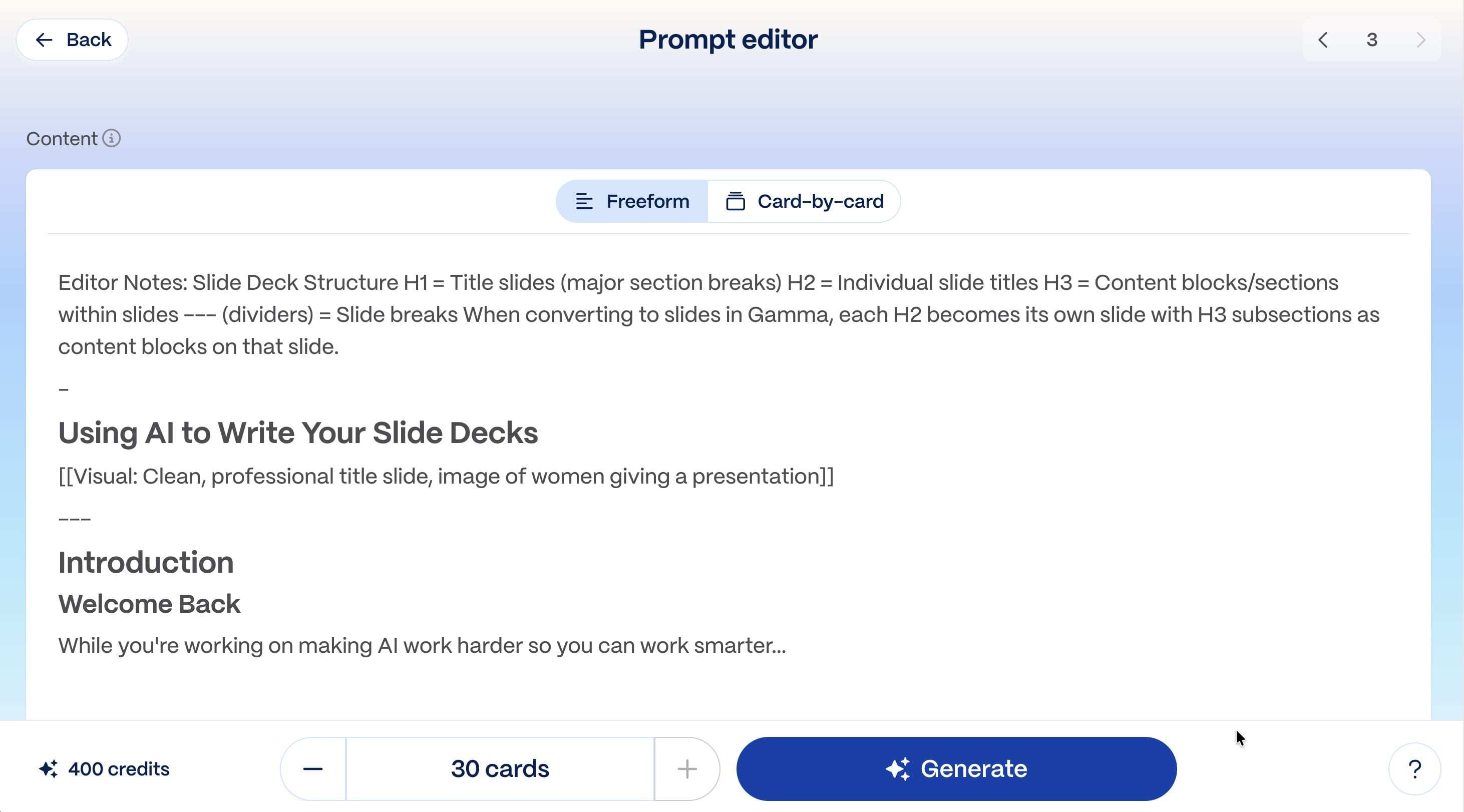
A while back I ended up in a blitz of making slides. Designing them kept turning into a time sink, so I reached for AI to help, and that's how I found Gamma. It was great. It laid everything out in my brand, and my decks looked great. Getting them designed got a lot faster.
The writing was still slow, though. I'd spend time tweaking and editing my slides so Gamma understood how I wanted them designed. Eventually I thought, why does it have to be this way? Couldn't I get AI to help with this part too? That's when I built this skill.
What it does
You bring what you already have. A brain dump, or rough notes.
Here's how I use it. I take my brain dump and pare it down into more of what I'm actually going to say, almost like a script or teleprompter copy. Then I hand that to the skill and it turns it into slides: one clear message each, in order, ready to design. And because I already know I'll be talking through the deck, I note the kind of visuals I want as I go. The skill keeps those cues in the output.
How the formatting works
You don't need to memorize any of this. The skill handles it for you. But it helps to recognize what you're looking at, because the structure is simple once you see it. It follows a small set of formatting rules, a legend the slide generator can read.
Think of it as a key the slide generator reads:
- A top-level heading marks a section or title slide.
- A heading one level down is a single slide. Each one becomes its own slide.
- A divider means start a new slide here.
- Short notes in brackets tell the design tool what visual to add: a photo, a diagram, a set of icons.
That's the whole idea. Headings set the slides, the divider breaks them, and the bracketed notes hand the design tool its visual direction. When you read the output, you can see exactly where each slide starts and what's meant to live on it.

Blessing Richardson
AI Strategist & Fractional Consultant
I built my first webpage in elementary. More than 20 years later, I still love web and software tech. While building is fun, there's so much more joy in watching others discover what technology makes possible.
Frequently Asked Questions
Do I need Gamma to use this?
No. The skill writes plain, formatted text that works in any AI slide tool. Gamma is just the one I reach for.
Do I have to learn the formatting myself?
Nope. Your AI uses the skill to do the formatting for you. You bring the content, the skill handles the structure.
What do I give it to start?
Whatever you've got. A brain dump, rough notes, a transcript, an outline, or an already-written article. The skill shapes it into slide-ready copy.
Where do I run this?
In Claude, ChatGPT, or any agent app at all. It's a skill your AI reads, not a separate app to open.
Can I use this for a full talk, not just a short deck?
It comes down to your workflow and the tools you're using. If you're building the deck yourself, it can be as long as you want, and tools like Gamma have their own settings for how many slides to create.
Does this write my slides or design them?
It writes them. You get clean slide copy with one clear message per slide, plus notes for the visuals you want. Your slide tool handles the actual design from there.